 Certia
Stop rubber-stamping access reviews.
Certia runs your quarterly Jira access-review campaign end to end — who has access, whether they still need it, and a certified record for your SOC 2 or ISO 27001 auditor. Built for the compliance admin who's currently doing this in a spreadsheet.
Free for sites up to 10 users at launch.
Every audit cycle, the same spreadsheet.
A compliance calendar reminder fires, someone exports a user list, and managers get an email asking them to confirm access they haven't thought about since it was granted. Under deadline pressure, "still needs it?" becomes "approve all."
Spreadsheet-and-email
- Reviewer sees a name and a group, no context on what that access actually does
- No reminder system — someone chases replies manually, or doesn't
- "Approved" with no note, no timestamp trail an auditor can verify
- A revoked-on-paper user often keeps their access, because nothing enforced the decision
Certia
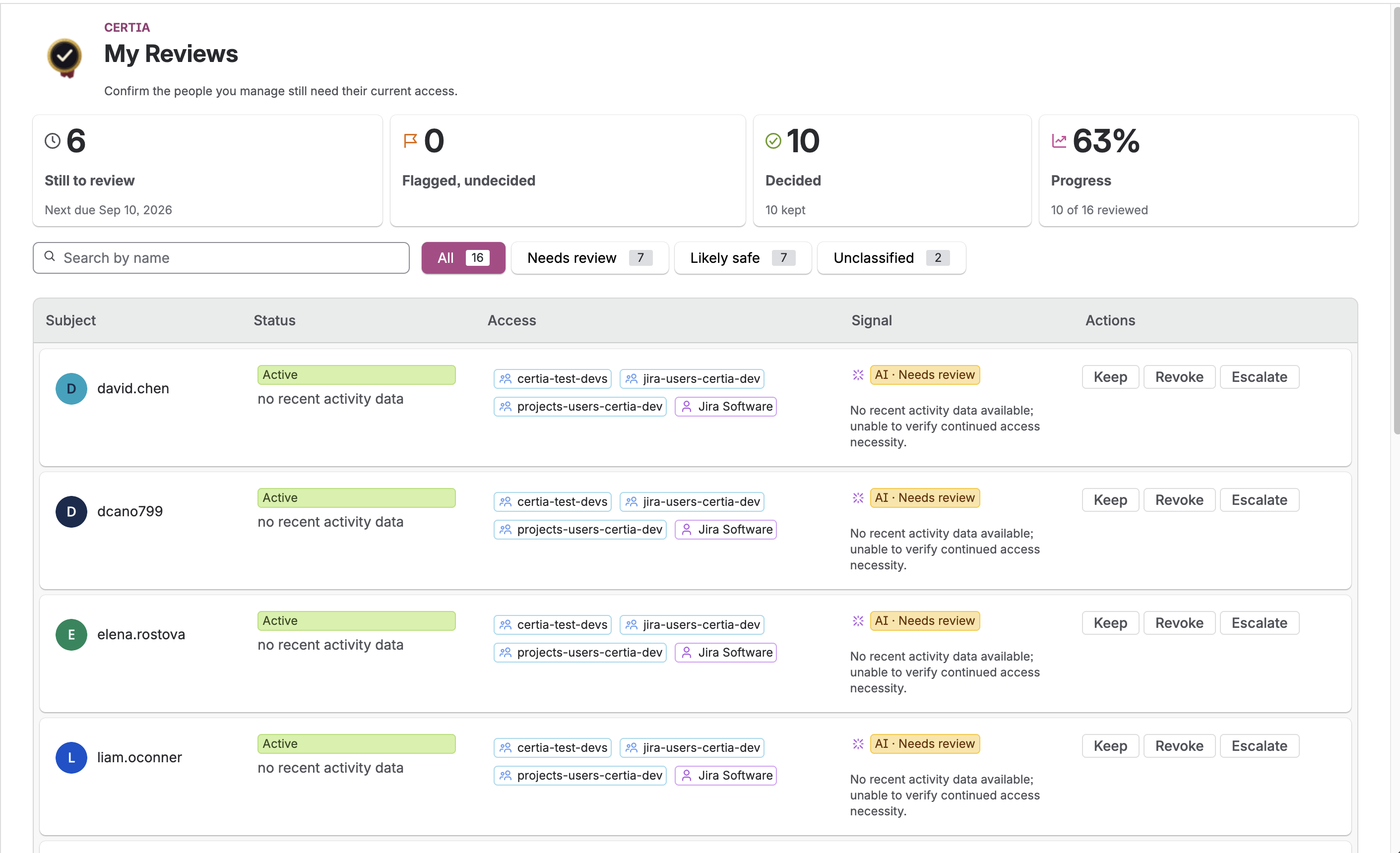
- Reviewer sees groups, roles, last-active date, and a flagged risk reason per person
- Automatic reminders, then automatic escalation on anything overdue
- Every decision requires a note and is written to an append-only audit log
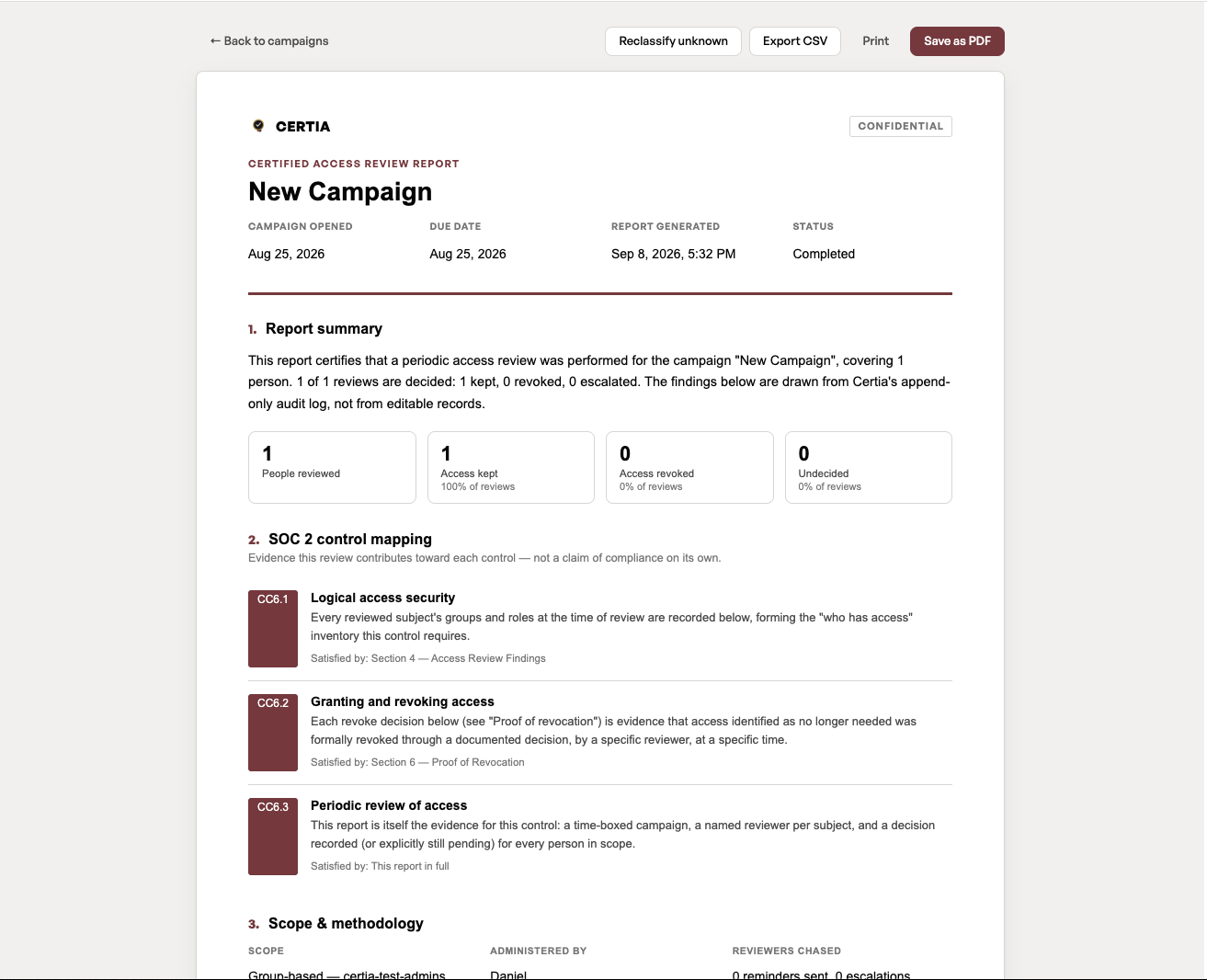
- A tamper-evident, SOC 2-mapped report at the end — not a snapshot of current state
Four steps, run inside Jira.
No separate tool to learn, no data leaving Atlassian's infrastructure except the narrow slice sent for AI pre-sorting — see exactly what that is in Security below.
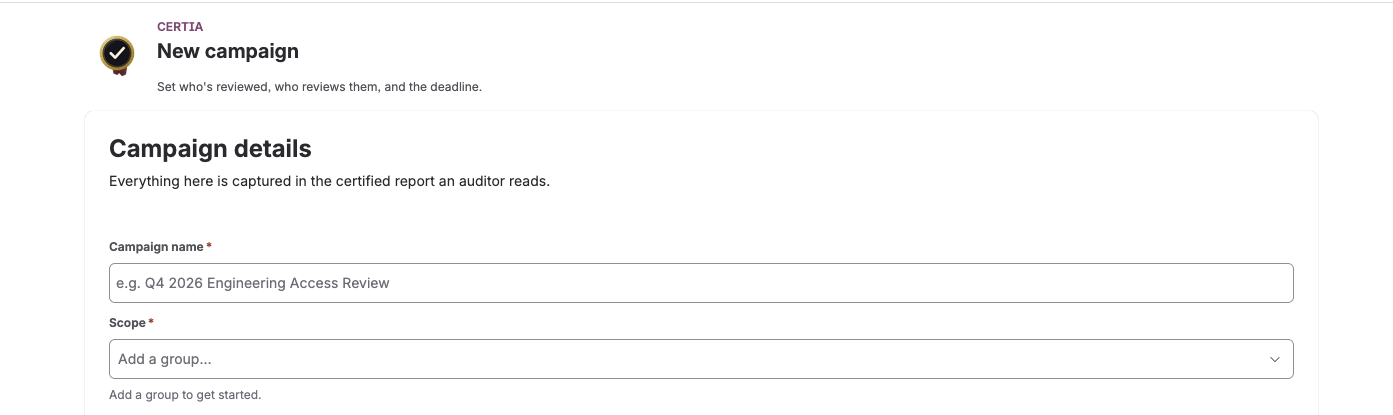
Scope a campaign
An admin picks the users or groups to review and sets a due date. Reviewers are assigned automatically from existing Jira roles.
Risk gets flagged
Certia pulls each person's groups, roles, and last-active data, and flags admin-level access, 90+ day inactivity, and external-domain accounts.
Reviewers decide
Each reviewer sees their people with full context and an AI-suggested safe / needs-review tag, then clicks Keep, Revoke, or Escalate — with a required note.
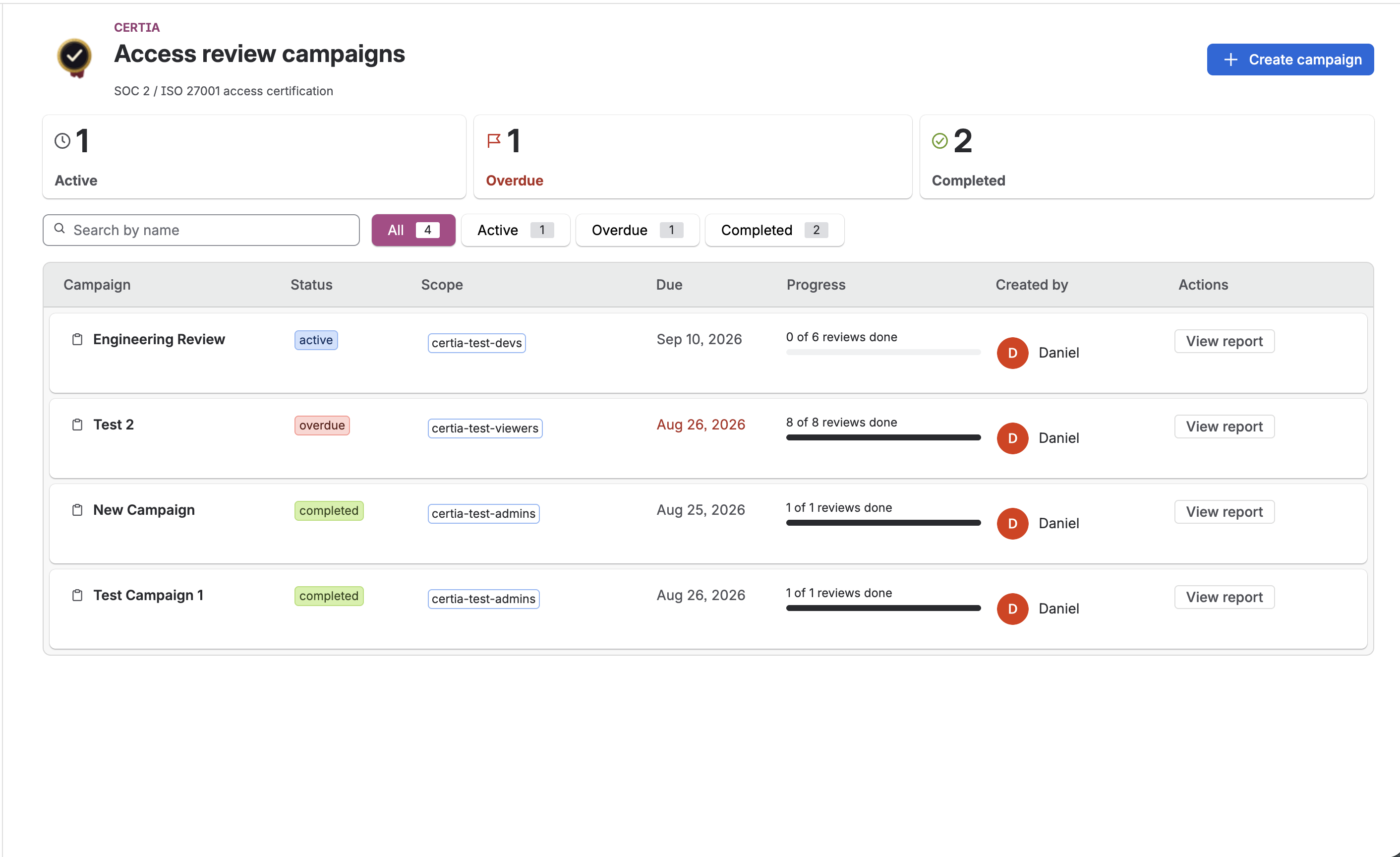
Certified report
Overdue items auto-escalate. At close, Certia rebuilds a SOC 2 CC6.1–CC6.3-mapped report from the audit log, with a sha256 integrity fingerprint and CSV/PDF export.
What it actually looks like — not a mockup.
Certia runs entirely inside Jira — from scoping a campaign to the certified report an auditor reads.
Not a spreadsheet. Not an enterprise IGA platform.
Access governance tools mostly serve two very different buyers. Certia is built for the one in between: a Jira-native team that needs a real, auditable review — not a six-figure identity-governance rollout.
Full context per person
Groups, roles, last-active date, and what a prior review decided — right where the reviewer makes the call, not in a separate tab they won't open.
AI pre-sorting, human decision
A likely-safe / needs-review tag on every item, so reviewers spend their attention on the accounts that actually warrant it. The AI never decides — it only sorts.
Certified, not just exported
The report is rebuilt from an append-only audit log with a sha256 fingerprint — a record of what happened, not a live query of current state that changes if someone edits a group tomorrow.
Built around the controls that actually get checked.
Certia maps its campaign workflow directly to the access-review controls an auditor tests — not a generic "compliance" claim.
SOC 2 — Logical Access
Covers periodic review and removal of access that's no longer needed — the part of a SOC 2 audit that access-review campaigns are built to evidence.
27001
ISO 27001 — Access Control
Supports the access-control requirements in Annex A that call for regular review of user access rights.
Certia produces evidence that a review was performed. It does not, by itself, make your organization SOC 2 or ISO 27001 compliant or certified — that determination is your auditor's. We say this plainly because overstating it is a real risk to you, not just careful phrasing on our part.
What Certia can see, and what it does with it.
Certia is a Jira/Confluence admin's tool, so it earns trust the same way any admin-facing app should: by being specific about access control and data flow, not by asserting "bank-grade security."
Hosted on Atlassian Forge
Certia runs entirely on Atlassian's Forge platform — no separate servers, no infrastructure we manage outside it. Storage is Atlassian's own Forge Storage, scoped to your site's installation.
Server-side authorization on every request
Every route that returns another person's data checks, on the server, that the caller actually holds your site's Jira admin permission — never inferred from which screen a request came from. A reviewer can only act on their own assigned items.
Read-only by default
Certia reads Jira/Confluence user, group, and role data to build a campaign; it doesn't modify group membership or permissions on its own. A revoke decision is a recorded decision, not an automatic change to your Jira instance.
Exactly what the AI classifier sees
- Group and role names
- Days since last active
- Computed risk-flag labels
- Name
- Email address
- Atlassian account ID
Full detail on data handling lives in the Privacy Policy, Data Processing Agreement, and Security Policy.
Priced by site size, on the Atlassian Marketplace.
Billed and processed entirely through Atlassian, like any Marketplace app. Annual billing costs 10× the monthly price, so a year is two months cheaper.
Same prices as the Marketplace listingFor sites with up to 10 Jira users.
- Full campaign workflow
- Risk flagging & AI pre-sorting
- Certified report export
A 25-person site pays $100 a month, or $1,000 a year billed annually.
- Everything in Free
- 30-day free trial
- Cancel any time from Jira's Manage apps page
Users past 100 cost $3.50, and users past 250 cost $2.50. The rate keeps stepping down above 1,000.
- Same features at every size
- Exact quote on the Marketplace pricing tab
| Users on your Jira site | Monthly price per user, in that band |
|---|---|
| 1–10 | Free |
| 11–100 | $4.00 / user / month (all users, including the first 10) |
| 101–250 | $3.50 / user / month for users 101–250 |
| 251–1,000 | $2.50 / user / month for users 251–1,000 |
| 1,000+ | Lower again; see the Marketplace pricing tab |
Questions a compliance buyer actually asks.
Does installing Certia make us SOC 2 or ISO 27001 compliant?
Which frameworks does it map to?
Where does our data live?
What does the AI actually see?
When can I actually install it?
What will it cost?
Built by Four Leafs Technology.
Four Leafs Technology is a small, focused software maker. Certia is our first product, and the one we're staying focused on rather than spreading thin across a dozen half-built ideas.
One product, done properly
Certia isn't a side feature bolted onto a bigger platform. It's the thing we build, maintain, and support directly — support requests reach the people who wrote the code.
Jira-native by design
Built on Atlassian Forge, running inside the tool your team already has open, rather than another login and another vendor to onboard.
Say what's true, not what sells
You'll notice that throughout this page — including the parts that undersell us, like being upfront that Certia produces evidence, not compliance itself.
Questions before launch, or just want to talk to a person? Reach us at [email protected].
Run your next access review in Certia, not a spreadsheet.
Install from the Atlassian Marketplace and scope your first campaign the same day.
Free for sites up to 10 users. Every plan starts with a 30-day free trial.